

Nothing irritates me more than a cluttered desktop.
Any more than 5 files and I start twitching.
I use my desktop as the temporary space for files, pictures, anything I don’t want to search for a home for, but need to use right away.
EACH MORNING OR NIGHT IS A BLANK SLATE
At the start of each morning, or at the end of each day, I go through and sweep through my desktop so it looks like this again:

(That mini castle is in Belem, Portugal 2011 where they have awesome pasteis de natas)
Each file goes through one of these actions:
- Review (if it’s on my desktop, it is there for an on-going reason)
- Keep
- Remove (e.g. move it completely from the computer, put it on another)
- Delete
- Rename
- Move (into folders for instance)
The goal is a clean desktop, and as a result, I don’t forget about things very easily if they’re right there, staring me in the face.
I also make lots of notes on my iPod Touch with AwesomeNotes, because this is how I organize my daily life digitally, and set reminders.
WHAT I CURRENTLY HAVE ON MY DESKTOP
Currently, you will notice I have an Ebates CANADA and a TD-Sell excel sheet on there.
I’m working on both at the moment, so they’re allowed to stay there until it’s done.
Ebates CANADA was to calculate how much I’d save going online rather than buying something in-store), and I don’t quite want to file them away yet, because it isn’t completed.
TD-Sell is when I plan on selling some investments because I’m re-balancing my portfolio, but am waiting for a certain benchmark.
UPDATE: Ebates Canada is not worth the hassle.
MACS ONLY: MY TEMPORARY RE-SIZED IMAGES FOLDER
At the very top, is my permanent but temporary re-sized images folder (oxymoronic, no?)
I re-size a lot of images to either 600px for the blog, or 1000px for other purposes (gives great detail but not everything the original has).
As a result, sometimes my desktop looks like a hot mess because of all the images going on at the moment.
It drove me so crazy, I created a temporary folder, and an Automator function on my Mac to dump all resized photos in there, but to keep the originals where they were.
How to create a Mac Automator function to automatically re-scale images
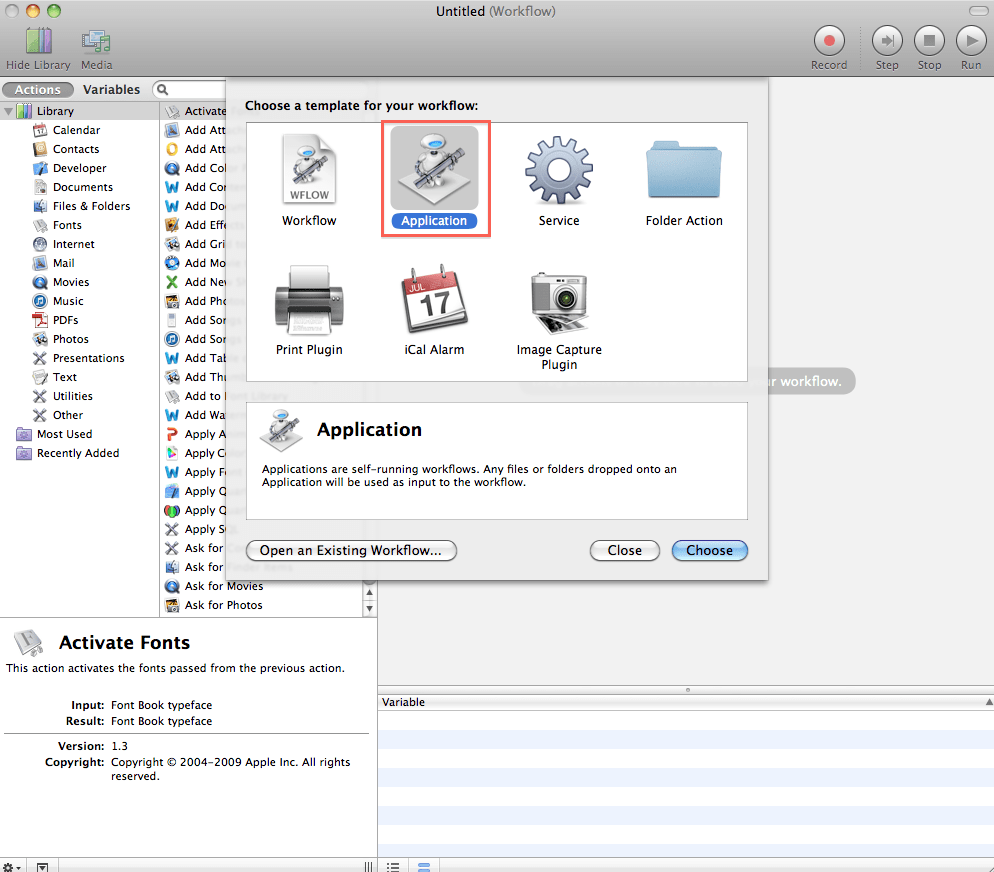
Find the App Automator which looks like a robot
Click on it
Click on Application > Choose
Now search for Scale Images, which is how they say “resize images”, and click and drag the action to the workflow window
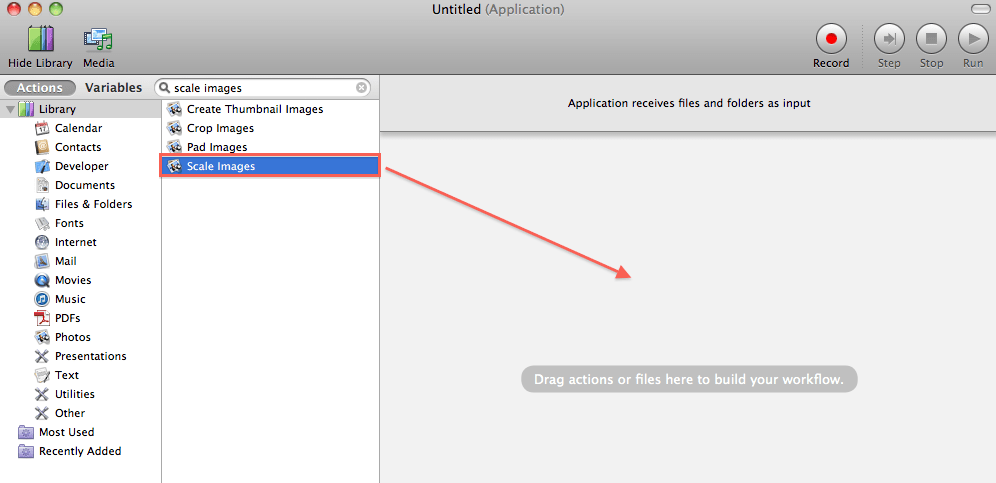
This pop-up will ask you if you want to create a copy finder so that your copies change in size, but not your originals.
Say Add (a.k.a. YES), or else your originals will be resized, and you may realize you didn’t want that after all and can’t go back.
You’ll see these actions appear in Workflow, and now you just have to direct the folder to your Temp folder on your desktop, and change how large you want the images to be scaled to:
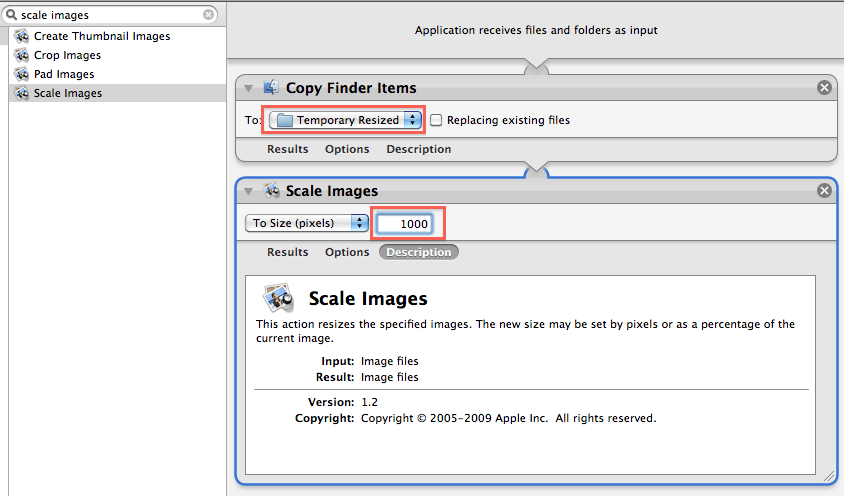
Don’t touch anything else, like “Replace existing files”, it’ll just screw up the point of preserving your original files.
You can do this Automator thing for a whole host of other services that are repetitive actions you don’t want to keep doing over and over again.


